
Features

Unlimited Questions
Once you have created an assignment, you can regenerate all of its questions with a single click. The new questions will conform to the same parameters as the original questions, but they will be completely new. This feature is at the heart of our software and is what makes it so powerful: you choose the properties of the questions, not the questions themselves. When a question is replaced, you get a new one that is similar to the original question. How it works. You can regenerate entire assignments, particular question groups, or individual questions.

Easy Spacing
Respace the entire assignment to the desired length with one click. Easily give your students enough room to show their work by increasing the spacing. Or you can save paper by decreasing the spacing.
Spacing can also be controlled manually.

Presentation Mode
Very useful as a teaching aid when used in combination with an LCD projector or other display system. One to four questions at a time are shown on the screen.
Use this feature while you teach. Prepare your examples with the software, and then use a projector to display the questions on the board. This saves time during planning and during the lesson, and it makes it very easy to present long questions or questions with graphs and diagrams. With one question displayed, you can:
- Change the zoom level -- so students in the back can read it
- Draw lines beside the question to help you organize your work if you solve the question
- Jump to another question -- useful while reviewing homework
- Reveal the answer
- Show / hide the question number and the directions.

Multiple-Version Printing
Print multiple versions of an assignment. You control how each new version is created: scramble the choices, scramble the questions, or make completely new questions. You can also save each new version after it is created.

Scale Assignment
Proportionally increase or decrease the number of questions in the assignment. This is very useful when planning a lesson. You can create a few questions to use as examples, and then scale up the number of question to create a homework assignment. The questions on the homework will be completely new, yet follow precisely from the lesson--and you don't need to design the questions again.

Export Questions
Export questions as bitmap images and paste them into your favorite word processing software. Questions created with our products can be added to existing assignments you have created with other programs. Or you can freshen old assignments by replacing old questions with new ones.
All questions are available for export.

Good Multiple-Choice Questions
Every question you create can be toggled between free-response and multiple-choice format. Multiple-choice questions come with smart, potentially misleading choices. Some are based on common mistakes students make while others are just random but near the correct answer.
You control the number of choices each question has, from two to five.

Merge Assignments
Merge two or more assignments into one. Easily create quizzes, tests, and reviews by merging the assignments from the unit and then scaling the total to an appropriate length. The questions will be new while following exactly from what you taught.

Diagrams Drawn to Scale
Diagrams are all accurately drawn, except if the answer would be given away. If an angle is labeled as 30°, then it really is 30°. If a triangle's sides are labeled 3, 4, and 5, then its lengths truly are in a 3:4:5 ratio. Seeing accurate diagrams helps students gain an intuitive understanding of angles and measurements.

Answer Format
When you print an assignment, you choose how the answers are reported:
- On an answer sheet
- On an answer sheet with just the odds
- In context (next to or within the question)
- No answer sheet

Graphing and Graph Paper Utility
Supplement your lessons with high-quality graphs and graph paper of any size. Each graph can have zero to two functions graphed on it. Graphs can be of any logical and physical size. You can also tile graphs across the page to maximize your paper use.
Custom Directions and Custom Questions
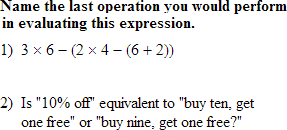
Enter your own directions to create new types of problems. This question was a standard order of operations question that has been modified to be more analytical. You can alter the directions on any question type.
From time to time, you will need to enter your own question. That's what custom questions are for. They can be either free response or multiple-choice and can contain math formatted text (equations, expressions, etc).

Modify Automatically-Generated Questions
Most automatically-generated questions can be modified manually. If there is a choice you don't like, you can change it. If you wish a question was slightly different, you can change it.

Paper Size and Margins

Print assignments on any sized paper that your printer supports. If you decide to print an assignment on legal-sized paper, no problem. The questions will automatically be repositioned for you--no cutting and pasting the assignment back together just to use a different paper size. You also have control over the margins, page numbering, and paper orientation.